
Table of Contents
- Overview
- Memory Settings
- Connection and Worker Settings
- WAL and Checkpoint Settings
- Autovacuum Settings
- Connection and Session Settings
- Essential PostgreSQL Extensions
- Connection Pooling and Connectivity
- References
Overview
It’s common knowledge that PostgreSQL is one of the most widely used relational databases in the world, so I decided to put together a collection of important configurations to help you get more out of it.
My first encounter with many of these settings was during the “Rinha de Backend” challenge by zanfranceschi, where participants competed to build a system capable of handling massive concurrent requests without bottlenecks or failures. The challenge had no restrictions, and many people disabled or tweaked Postgres settings to squeeze out more performance (even if less safe for real production environments).
In practice, everything I cover here comes from the official PostgreSQL documentation (which I read for the first time while writing this post). It’s a large doc, though, and many settings have very specific use cases, so I think it’s worth summarizing just the most important ones.
The goal here isn’t to cover what you’d normally learn about relational databases — indexes, SQL, constraints, procedures — but to talk about what nobody taught me in college: networking, advanced configuration, and extensions.
About Postgres
PostgreSQL — or just Postgres — is a relational database. It’s a mature and very flexible one, capable of storing nested structures or defining complex custom data types. PostgreSQL’s performance depends heavily on proper configuration, since the defaults are conservative and designed for compatibility, not performance.
Settings can be placed in a postgresql.conf file, like in the example below for a 16GB RAM server:
# Memory Settingsshared_buffers = 4GB # 25% of RAMwork_mem = 16MB # Memory per sort/hash operationmaintenance_work_mem = 1GB # For VACUUM, CREATE INDEXeffective_cache_size = 12GB # 75% of RAM (hint for the query planner)
# Connection Settingsmax_connections = 200 # Use connection pooling for morelisten_addresses = '*' # Accept remote connections
# Workers and Parallelismmax_worker_processes = 20max_parallel_workers = 12max_parallel_workers_per_gather = 4
# WAL and Checkpointwal_level = replica # For replicationmax_wal_size = 4GBcheckpoint_timeout = 15mincheckpoint_completion_target = 0.9
# Autovacuumautovacuum = onautovacuum_max_workers = 4autovacuum_naptime = 30s
# Connection and Sessiontcp_keepalives_idle = 300 # Detect dead connectionsidle_session_timeout = 30min # Close idle sessions
# Extensionsshared_preload_libraries = 'pg_stat_statements, pg_cron'I’ll walk through some of these settings and what they mean. There are many more out there, but if I listed them all, you’d be better off just reading the docs. The idea is to highlight the ones that matter most for improving your database’s performance.
Memory Settings
shared_buffers
Description: PostgreSQL’s primary cache. All data read from disk is first loaded into shared buffers, and writes are also staged here before being flushed to disk.
Why It Matters: This is your database’s working memory. Every read operation checks this cache first. If the cache is too small, you’ll get high cache miss rates and constant disk I/O to fetch data. If it’s too large, you’ll waste resources unnecessarily.
Sweet Spot: 15–25% of total RAM is the standard recommendation, though it can vary depending on your workload.
# For a server with 16GB RAMshared_buffers = 4GB
# For a server with 64GB RAMshared_buffers = 16GBBeyond 25% of RAM, you get diminishing returns because PostgreSQL also relies on the OS filesystem cache. The OS is generally better at caching than PostgreSQL’s own buffer pool.
work_mem
Description: Memory allocated for internal operations and processing. If the workload is too heavy and hits this limit, to avoid out-of-memory (OOM) errors the database starts processing data on disk. Slow, but it prevents crashes. This is called a Disk Spill.
If this value is set too high, the query planner can go a little crazy and start making less efficient plans because it thinks it has plenty of memory.
Sweet Spot: 4–32MB (context-dependent)
Why It Matters: work_mem that’s too low causes queries to spill to disk, drastically slowing things down. work_mem that’s too high can cause OOM errors.
work_mem = 16MBA single complex query can spawn multiple sort/hash/join operations. The formula is:
Potential Memory = work_mem × max_connections × operations_per_queryWith 100 connections, 16MB work_mem, and an average of 3 operations per query, you could consume 4.8GB.
maintenance_work_mem
Description: Memory used for maintenance operations like VACUUM, CREATE INDEX, ALTER TABLE, and FOREIGN KEY constraint checks.
Default: 64MB
Sweet Spot: 256MB – 2GB
Why It Matters: Higher values significantly speed up index creation, vacuuming, and other maintenance tasks. Unlike work_mem, typically only one maintenance operation runs at a time.
# For servers with 16GB+ RAMmaintenance_work_mem = 1GB
# For large databases (100GB+)maintenance_work_mem = 2GBThis doesn’t affect normal query performance, but it dramatically improves the speed of bulk operations and routine maintenance.
Connection and Worker Settings
max_connections
Description: The maximum number of simultaneous connections to the database allowed. If an application is hitting bottlenecks between backend and database, the culprit might be a low number of simultaneous connections.
Default: 100
Sweet Spot: 100–400 (highly dependent on workload)
Why It Matters: Each connection consumes memory (several MB) for connection overhead. Too many connections create contention and resource exhaustion.
# For web apps with connection poolingmax_connections = 200A very high number of connections can consume too many resources and cause “Too many connections” errors.
Instead of opening lots of simultaneous connections, consider connection pooling (PgBouncer, pgpool-II). This way, instead of constantly creating new connections (which have overhead), you keep connections alive with a max idle time before they’re closed.
max_worker_processes
Description: The maximum number of background worker processes the system can support. This is the total budget for all background workers.
Default: 8
Why It Matters: This is the foundation for parallelism. Parallel queries, autovacuum workers, logical replication workers, and background workers all draw from this pool.
max_worker_processes = 16max_parallel_workers
Description: The maximum number of workers that can be used for parallel query execution across the entire system.
Default: 8
Sweet Spot: 50–75% of CPU cores
Why It Matters: Allows PostgreSQL to parallelize query execution, significantly speeding up large scans and aggregations.
# For a 16-core servermax_parallel_workers = 12Constraint: Cannot exceed max_worker_processes.
WAL and Checkpoint Settings
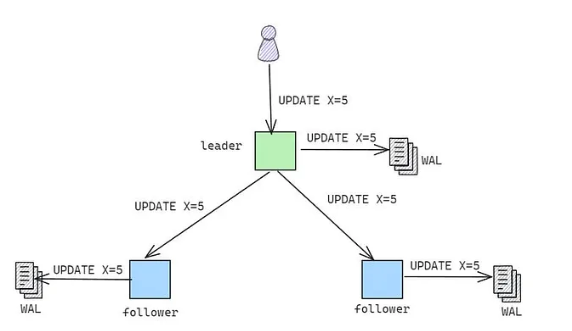
WAL → A technique used by Postgres and other databases to guarantee durability and consistency. It records all changes made to the database in an append-only log before the change is applied. This ensures that every committed transaction has its log entry saved. This is important for replicating changes to read replicas (which need to know what happened on the write replica) and for disaster recovery.
wal_level
Description: Determines how much information is written to the Write-Ahead Log (WAL).
Default: replica
Sweet Spot:
minimalfor standalone databases without replication (fastest)replicafor streaming replicationlogicalfor logical replication
Why It Matters: Lower levels mean less WAL overhead but disable replication features.
# For production with replicationwal_level = replica
# For bulk loads (temporarily)wal_level = minimalmax_wal_size
Description: Maximum size of WAL files before triggering a checkpoint.
Default: 1GB
Sweet Spot: 2GB – 16GB (depends on write volume)
Why It Matters: Larger values reduce checkpoint frequency, improving write performance but increasing recovery time.
# For moderate write loadsmax_wal_size = 4GB
# For heavy write loadsmax_wal_size = 8GBLarger values mean longer crash recovery time.
checkpoint_timeout
Description: Maximum time between automatic WAL checkpoints.
Default: 5 minutes
Sweet Spot: 10–30 minutes
Why It Matters: Checkpoints cause I/O spikes. Less frequent checkpoints smooth out I/O but increase recovery time.
# For heavy write loadscheckpoint_timeout = 15min
# For very heavy write loadscheckpoint_timeout = 30minAutovacuum Settings
VACUUM → If you delete 10,000 rows from your database, the size of your database doesn’t change. What databases like Postgres do is mark those rows as dead. This happens because a fast delete/update operation (physically deleting/modifying can take time) is preferable. This is called MVCC (Multi-Version Concurrency Control), where rows aren’t overwritten but instead a new version is created to avoid concurrency errors. What VACUUM does is physically delete the rows that were marked as dead or modified.
autovacuum
Description: Enables the autovacuum daemon for automatic database maintenance — in other words, it automates VACUUM.
Default: on
Sweet Spot: on (always)
Why It Matters: Autovacuum prevents transaction ID wraparound, removes dead tuples, and updates statistics. Disabling it is almost never recommended.
autovacuum = onDisabling autovacuum can lead to severe performance degradation and database corruption (transaction ID wraparound).
autovacuum_max_workers
Description: Maximum number of autovacuum processes that can run simultaneously.
Default: 3
Sweet Spot: 3–6
Why It Matters: More workers can vacuum multiple tables concurrently, which matters for databases with many active tables.
# For databases with many tablesautovacuum_max_workers = 6More workers consume more resources but keep tables cleaner under heavy write loads.
autovacuum_naptime
Description: Minimum delay between autovacuum runs on any given database.
Default: 1 minute
Sweet Spot: 30 seconds – 1 minute
Why It Matters: Controls how often autovacuum checks whether there’s work to do.
# For heavy write loadsautovacuum_naptime = 30sConnection and Session Settings
tcp_keepalives_idle
Description: Time before sending a TCP keepalive packet to detect dead connections.
Default: 0 (uses OS default, typically 2 hours)
Sweet Spot: 60–600 seconds
Why It Matters: Detects and closes dead connections faster, preventing connection slot exhaustion.
# Detect dead connections within 5 minutestcp_keepalives_idle = 300idle_session_timeout
Description: Automatically terminates sessions that have been idle for the specified duration.
Default: 0 (disabled)
Sweet Spot: 10–60 minutes (application-dependent)
Why It Matters: Prevents idle connections from holding connection slots indefinitely.
# Close connections idle for 30 minutesidle_session_timeout = 30minUseful when applications don’t close connections properly.
PostgreSQL Extensions
PostgreSQL’s extension system lets you add functionality without modifying the database core. Extensions are pre-packaged modules that can be installed and enabled per database.
How to Install and Enable Extensions
-- Check available extensionsSELECT * FROM pg_available_extensions;
-- Enable an extensionCREATE EXTENSION IF NOT EXISTS extension_name;
-- Check installed extensions\dxPopular Extension Examples
pg_trgm
Description: Provides text similarity matching based on trigrams and fast full-text search using GIN/GiST indexes.
Use Cases:
- Fuzzy text search (finding similar strings)
- Autocomplete functionality
- Typo-tolerant search
- Fast LIKE/ILIKE queries with pattern matching
Why It Matters: Enables high-performance similarity searches that would otherwise require external search engines. Particularly useful for user-facing search features.
-- Enable the extensionCREATE EXTENSION IF NOT EXISTS pg_trgm;
-- Create a GIN index for fast similarity searchesCREATE INDEX idx_users_name_trgm ON users USING GIN (name gin_trgm_ops);
-- Find similar names (fuzzy matching)SELECT name, similarity(name, 'John Doe') AS simFROM usersWHERE similarity(name, 'John Doe') > 0.3ORDER BY sim DESC;
-- Fast pattern matching with index supportSELECT * FROM usersWHERE name ILIKE '%john%';
-- Find records with typosSELECT * FROM productsWHERE name % 'iPone'; -- Will match 'iPhone'Key Functions:
similarity(text, text)- Returns similarity score (0-1)word_similarity(text, text)- Word-based similaritytext % text- Similarity operator (configurable threshold)
pgvector
Description: Adds vector data types and similarity search capabilities for AI/ML applications, enabling efficient storage and querying of embeddings.
Use Cases:
- Semantic search
- Recommendation systems
- Image similarity search
- AI-powered applications using OpenAI, Cohere, etc. embeddings
Why It Matters: Essential for modern AI applications. Lets you store embeddings directly in PostgreSQL and perform efficient nearest-neighbor searches without external vector databases.
-- Enable the extensionCREATE EXTENSION IF NOT EXISTS vector;
-- Create a table with a vector columnCREATE TABLE documents ( id SERIAL PRIMARY KEY, content TEXT, embedding vector(1536) -- OpenAI ada-002 embedding dimension);
-- Create an index for fast similarity searchCREATE INDEX ON documents USING ivfflat (embedding vector_cosine_ops)WITH (lists = 100);
-- Or use HNSW for better performance (PostgreSQL 16+)CREATE INDEX ON documents USING hnsw (embedding vector_cosine_ops);
-- Find similar documents (cosine similarity)SELECT id, content, 1 - (embedding <=> '[0.1, 0.2, ...]'::vector) AS similarityFROM documentsORDER BY embedding <=> '[0.1, 0.2, ...]'::vectorLIMIT 10;
-- Available distance operators:-- <-> (L2 distance)-- <=> (cosine distance)-- <#> (inner product)pgcrypto
Description: Provides cryptographic functions for encryption, hashing, and random data generation.
Use Cases:
- Password hashing
- Data encryption at rest
- Secure token generation
- PGP encryption/decryption
Why It Matters: Enables secure data storage without application-level encryption. Built-in cryptographic functions ensure consistent security practices.
-- Enable the extensionCREATE EXTENSION IF NOT EXISTS pgcrypto;
-- Hash passwords (bcrypt)INSERT INTO users (email, password_hash)VALUES ('user@example.com', crypt('user_password', gen_salt('bf')));
-- Verify passwordSELECT * FROM usersWHERE email = 'user@example.com' AND password_hash = crypt('user_password', password_hash);
-- Generate random UUIDsSELECT gen_random_uuid();
-- Encrypt/decrypt data-- Symmetric encryptionSELECT pgp_sym_encrypt('sensitive data', 'encryption_key');SELECT pgp_sym_decrypt(encrypted_column, 'encryption_key') FROM table_name;
-- Generate secure random bytesSELECT gen_random_bytes(32);
-- Hash functionsSELECT digest('data', 'sha256');SELECT encode(digest('data', 'sha512'), 'hex');citext
Description: A case-insensitive text type that behaves like regular text but with case-insensitive comparisons and indexing.
Use Cases:
- Email addresses
- Usernames
- Case-insensitive unique constraints
- Search without ILIKE performance penalties
Why It Matters: Simplifies case-insensitive operations without needing LOWER() functions everywhere. Preserves the original case while comparing case-insensitively.
-- Enable the extensionCREATE EXTENSION IF NOT EXISTS citext;
-- Create a table with case-insensitive columnsCREATE TABLE users ( id SERIAL PRIMARY KEY, email citext UNIQUE, -- Case-insensitive uniqueness username citext NOT NULL);
-- These will be treated as duplicatesINSERT INTO users (email, username)VALUES ('User@Example.com', 'JohnDoe');
-- This will fail (duplicate email)INSERT INTO users (email, username)VALUES ('user@example.com', 'JaneDoe');
-- Case-insensitive comparisons (no ILIKE needed)SELECT * FROM users WHERE email = 'USER@EXAMPLE.COM';
-- Index works with case-insensitive searchesCREATE INDEX idx_users_email ON users(email);Key Benefits:
- Preserves the original casing in storage
- Automatic case-insensitive comparisons
- Works with B-tree indexes
- No need for functional indexes on LOWER()
uuid-ossp
Description: Generates universally unique identifiers (UUIDs) using various algorithms.
Use Cases:
- Primary keys for distributed systems
- Non-sequential identifiers
- Public-facing IDs (URLs, APIs)
- Safe identifiers for cross-database merges
Why It Matters: UUIDs prevent ID collisions in distributed systems and hide sequential patterns. Essential for microservices and multi-region deployments.
-- Enable the extensionCREATE EXTENSION IF NOT EXISTS "uuid-ossp";
-- Create a table with a UUID primary keyCREATE TABLE orders ( id UUID PRIMARY KEY DEFAULT uuid_generate_v4(), customer_id UUID NOT NULL, total DECIMAL(10,2));
-- Available UUID generation functions:SELECT uuid_generate_v1(); -- Time-basedSELECT uuid_generate_v4(); -- Random (most common)
-- Insert with auto-generated UUIDINSERT INTO orders (customer_id, total)VALUES ('a0eebc99-9c0b-4ef8-bb6d-6bb9bd380a11', 99.99);UUID Versions:
v1- Time-based (includes MAC address, potential privacy concern)v4- Random (recommended for most use cases)
Trade-offs:
- Pros: Globally unique, non-sequential, safe for merging
- Cons: 16 bytes vs 4-8 bytes for integers, slightly slower indexes
pg_cron
Description: A simple cron-based task scheduler that runs inside PostgreSQL.
Use Cases:
- Periodic data cleanup
- Scheduled aggregations
- Automated maintenance tasks
- Recurring report generation
Why It Matters: Eliminates the need for external schedulers for database-centric tasks. Jobs run with database-level guarantees and can use SQL directly.
-- Enable the extension (requires superuser)CREATE EXTENSION IF NOT EXISTS pg_cron;
-- Schedule a job (daily cleanup at 3 AM)SELECT cron.schedule( 'cleanup-old-logs', '0 3 * * *', 'DELETE FROM logs WHERE created_at < NOW() - INTERVAL ''90 days''');
-- Schedule aggregation every 15 minutesSELECT cron.schedule( 'update-stats', '*/15 * * * *', 'REFRESH MATERIALIZED VIEW CONCURRENTLY user_stats');
-- View scheduled jobsSELECT * FROM cron.job;
-- View job execution historySELECT * FROM cron.job_run_detailsORDER BY start_time DESCLIMIT 10;
-- Unschedule a jobSELECT cron.unschedule('cleanup-old-logs');Configuration:
Add to postgresql.conf:
shared_preload_libraries = 'pg_cron'cron.database_name = 'your_database'Cron Syntax:
┌───────────── minute (0 - 59)│ ┌───────────── hour (0 - 23)│ │ ┌───────────── day of month (1 - 31)│ │ │ ┌───────────── month (1 - 12)│ │ │ │ ┌───────────── day of week (0 - 6) (Sunday to Saturday)│ │ │ │ ││ │ │ │ │* * * * *Connection Pooling and Connectivity
Why Connection Pooling Matters
PostgreSQL creates a new server process for each connection, which consumes significant memory and resources. Without connection pooling, applications can quickly exhaust available connections, leading to “too many connections” errors and performance degradation.
The Problem:
Example: Each connection = ~10MB RAM + CPU overhead100 connections = ~1GB RAM minimum1000 connections = System degradationThe Solution: Connection pooling maintains a smaller pool of database connections that are shared among many application connections, without needing to create a new connection for every transaction.
PgBouncer
Description: A lightweight connection pool for PostgreSQL. The most popular and widely used solution.
Why It Matters: PgBouncer can handle thousands of client connections while maintaining a small pool of actual database connections, reducing database overhead.
Pooling Modes:
-
Session Pooling: Connection assigned to the client for the entire session
-
Transaction Pooling (Recommended): Connection returned to the pool after each transaction
Configuration example (/etc/pgbouncer/pgbouncer.ini):
[databases]mydb = host=localhost port=5432 dbname=mydb
[pgbouncer]listen_addr = 127.0.0.1listen_port = 6432auth_type = md5auth_file = /etc/pgbouncer/userlist.txt
# Connection pool settingspool_mode = transactionmax_client_conn = 1000default_pool_size = 25reserve_pool_size = 5reserve_pool_timeout = 3
# Performance tuningserver_idle_timeout = 600query_timeout = 60Application-Level Pooling
Many frameworks and database access libraries offer built-in pooling. This approach is simpler to set up but less flexible than dedicated solutions like PgBouncer.
Node.js (pg-pool):
const { Pool } = require('pg');
const pool = new Pool({ host: 'localhost', database: 'mydb', user: 'username', password: 'password', max: 20, // Maximum connections in the pool idleTimeoutMillis: 30000, // Time before closing an idle connection connectionTimeoutMillis: 2000,});
// Usageconst result = await pool.query('SELECT * FROM users WHERE id = $1', [userId]);Java (HikariCP):
HikariConfig config = new HikariConfig();config.setJdbcUrl("jdbc:postgresql://localhost:5432/mydb");config.setUsername("username");config.setPassword("password");config.setMaximumPoolSize(20);config.setMinimumIdle(5);config.setIdleTimeout(300000);config.setConnectionTimeout(20000);
HikariDataSource dataSource = new HikariDataSource(config);Python (SQLAlchemy):
from sqlalchemy import create_engine
engine = create_engine( "postgresql://username:password@localhost/mydb", pool_size=10, max_overflow=20, pool_timeout=30, pool_recycle=1800,)When to use application pooling vs PgBouncer:
- Application pooling: Simple, monolithic applications, less operational overhead
- PgBouncer: Multiple applications, microservices, need for centralized control
Sizing Your Connection Pool
Signs of a poorly sized pool:
- Pool too small: Connection timeouts, high latency, wait queues
- Pool too large: High memory usage, CPU contention, too many idle connections