Table of Contents
Overview
We all know documentation is important. Without it, we’d lose code context over time, specific changes would go unexplained, and accumulated knowledge would simply evaporate with team turnover.
The problem is that keeping documentation up to date is hard. Engineers have tight deadlines and documentation rarely makes it into the definition of done. The result is the same old story: a Notion workspace full of outdated pages that nobody trusts anymore.
With the rise of AI, we can reduce this problem for the cost of a few tokens. I was inspired by how this was done internally at the company I work for, and this article discusses the strategies that actually worked in practice: ADRs, living documentation integrated with CI/CD, and how to set up AI agents to keep it all running.
Chained ADRs
What is an ADR
An ADR (Architectural Decision Record) is a document created when an important architectural decision is made. It records the context of the discussion, the pros and cons evaluated, and the reason why that decision was necessary.
Examples of decisions that generate ADRs:
- Which programming language or framework to adopt
- Which database to use and why
- How to handle request spikes
- Authentication and authorization strategy
Examples of ADRs and other details can be explored in the following public repository.
The problem with traditional ADRs
What usually happens in real life is: ADRs are created, sit in a Notion or repository, and are often never revisited. No engineer can remember the full context of every ADR in a company, let alone ADRs written years ago by people who no longer work there.
The result is inconsistency. For example: a decision to use MariaDB was made for a reason nobody remembers anymore, and a new database decision completely ignores the previous reasoning.
Chained ADRs with AI
Here I start exploring a solution that uses AI agents for the highlighted problem: creating a centralized Git repository for all ADRs where each ADR is built on top of the previous one, with no parallelism.
The flow is:
- A branch is created to write the new ADR
- The team reviews and merges it
- Only then can the next ADR be created
ADR-0001 accepted │ ▼Create branch for ADR-0002 │ ▼ Team reviews ◀──────────────┐ │ │ ▼ │ Approved? ──No──▶ Revision and correction │ Yes │ ▼Merge ADR-0002 │ ▼Create branch for ADR-0003 │ ▼ ...This way, the ADR history is a linear, sequential timeline. An ADR is created only after the previous one has been accepted. In other words, ADR-0002 requires the existence of ADR-0001. This way, AI agents will have access to a timeline and all the organized context of a codebase.
With all this context, we can ask the agents, for example:
- Does any ADR explain why we changed X feature?
- What was the prior context for making the decision in ADR-0052?
- Does my new ADR created today have inconsistencies with any existing ones?
The 3-agent pipeline
To automate the creation of new ADRs, we split the workflow into 3 sub-agents:
create-adr-base— The sub-agent creates the base of the new ADR by iterating on decisions with the responsible engineer, using relevant questions about the problem to be solved.get-context— The sub-agent reads all previous ADRs linearly to build the context for the main agent.review-adr— The sub-agent reviews the created ADR looking for inconsistencies with previous ones based on the context.
Prompt examples (extremely simple because I don’t want to write a 100-line text for each one):
create-adr-base:
You are an assistant specialized in creating ADRs (Architectural Decision Records).
1. Ask the engineer which architectural decision needs to be recorded.2. Ask iterative questions to understand: the problem, the alternatives considered, the trade-offs, and the final decision.3. Generate the ADR in the standard format (Title, Status, Context, Decision, Consequences) following the repository's sequential numbering.4. Save the file as ADR-XXXX.md on the corresponding branch.get-context:
You are a context sub-agent for ADRs.
1. Read all ADR-*.md files from the repository in ascending numerical order.2. For each ADR, extract: number, title, status, main decision, and consequences.3. Return a structured summary of all ADRs to serve as context for the review agent. Prioritize information about active decisions (not superseded).review-adr:
You are an ADR reviewer. You will receive:- The new ADR to be reviewed- The context of all previous ADRs (provided by the get-context sub-agent)
Your task:1. Check if the new ADR contradicts previously active decisions.2. Identify if any previous ADR should have its status updated to "superseded" based on this new decision.3. Point out inconsistencies in terminology, standards, or conventions.4. Return a review report with: approved/rejected and a list of observations.The context problem
If you’ve read this far, you’ve probably asked yourself: is this scalable? The answer is: No.
For example, if you have 200 ADRs, you’ll spend a lot of tokens reading all of them with a sub-agent or you’ll exceed a model’s context window. It’s up to the team to understand if the cost is worth the benefit. That said, there are some strategies to reduce context, such as:
- Limit to recent ADRs: process only the last X ADRs (using the get-context sub-agent), assuming older ones have already been incorporated and aren’t important for recent decision-making.
- Separation by domain: create domains (infra, data, product), reducing the volume of context needed for an ADR within a specific domain. For example: when creating an ADR about database tables, you can use the get-context sub-agent only to load other documents related to databases.
- Summary file: maintain a
SUMMARY.mdwith just a few lines explaining the content of every ADR. The agent reads the summary first and only fetches the full ADR when necessary.
Living Documentation
Beyond ADRs, there’s the problem of updating day-to-day documentation: READMEs, setup guides, architecture diagrams. These documents get outdated quickly if there’s no effort to keep them always up to date.
Nowadays you can reduce this by:
- Keeping documentation versioned in Git (even as submodules of other repositories: for example, having a centralized repository just for documents)
- Instructing your AI agent so that every relevant code change also updates the documentation.
Centralized documentation repository
An approach that works well is creating a separate repository just for documentation, for example product-docs, and adding it as a submodule in the code repositories.
# In the product repositorygit submodule add git@github.com:your-org/product-docs.git docsThe structure looks like this:
product-api/├── src/├── tests/├── docs/ ← submodule pointing to product-docs│ ├── ADRs/│ ├── post-mortems/│ ├── documentations/│ └── design-systems/└── .gitmodulesThe advantages of this approach:
- Documentation accessible alongside the code, but with an independent lifecycle. Engineers can merge doc PRs without affecting the code and vice-versa.
- A single documentation repository can be a submodule of multiple projects. If your organization has
product-api,product-web, andproduct-mobile, they all share the sameproduct-docs. - Separate permissions. Product, QA, or technical documentation teams can have write access to
product-docswithout needing access to code repositories. - AI agents operate on a local folder. Tools like Claude Code can read and edit documentation directly in the submodule, without needing external integrations.
Automating with Claude via CI/CD
You can update your documentation simply by asking agents or by creating a skill for it. A practical way to implement the second requirement is to use claude-code-action directly in the CI/CD pipeline. The agent runs as a step in GitHub Actions, reads the diff of the approved PR, and updates the documentation automatically.
Example 1 — Update README.md after merge to main:
name: Update README.md
on: push: branches: [main]
jobs: update-docs: runs-on: ubuntu-latest steps: - uses: actions/checkout@v4 with: fetch-depth: 2
- name: Run Claude to update README.md uses: anthropics/claude-code-action@beta with: anthropic_api_key: ${{ secrets.ANTHROPIC_API_KEY }} prompt: | Analyze the diff of the last commit (git diff HEAD~1 HEAD). If there are relevant changes in architecture, new commands, dependencies, or code conventions, update the README.md to reflect the current state of the project. Commit the changes with the message "docs: update README.md [skip ci]".Example 2 — Update Notion pages after a merged PR:
name: Update Notion Docs
on: pull_request: types: [closed] branches: [main]
jobs: sync-notion: if: github.event.pull_request.merged == true runs-on: ubuntu-latest steps: - uses: actions/checkout@v4 with: fetch-depth: 0
- name: Sync docs to Notion via Claude uses: anthropics/claude-code-action@beta with: anthropic_api_key: ${{ secrets.ANTHROPIC_API_KEY }} prompt: | Read the diff of the PR "${{ github.event.pull_request.title }}". Identify changes that impact public documentation (APIs, setup, architecture). Use the Notion MCP integration to create or update the corresponding pages. env: NOTION_TOKEN: ${{ secrets.NOTION_TOKEN }}The pattern is always the same: PR merged → CI triggers → Claude reads the diff → documentation updated automatically. The only difference is the destination (local file, Notion, or Obsidian).
Integrations
Notion integration via MCP
For those who store documentation and documents in Notion, you can use an MCP integration that allows creating and modifying documents via code and AI agents.
This avoids the effort of manually creating texts in Notion which, although it has built-in AI, isn’t as capable as a Codex or Claude Code.
The proposed flow:
Engineer makes a code change │ ▼AI agent reads the changes │ ▼Notion MCP activation │ ▼Creates/updates page in NotionMore information at https://developers.notion.com/guides/mcp/get-started-with-mcp
Obsidian as a Git repository
Obsidian is the alternative I prefer. Unlike Notion (cloud and closed-source), Obsidian saves documents in a local folder that can be a Git repository or a regular folder.
This gives you:
- Diff review before accepting any documentation change
- Complete history of commits and document versions via Git
- Knowledge graph — Obsidian maintains a graph of links between documents, which allows agents to navigate between related pages during a search. In practice, you can create an inter-document knowledge graph that AI models can easily explore, since one document references another.
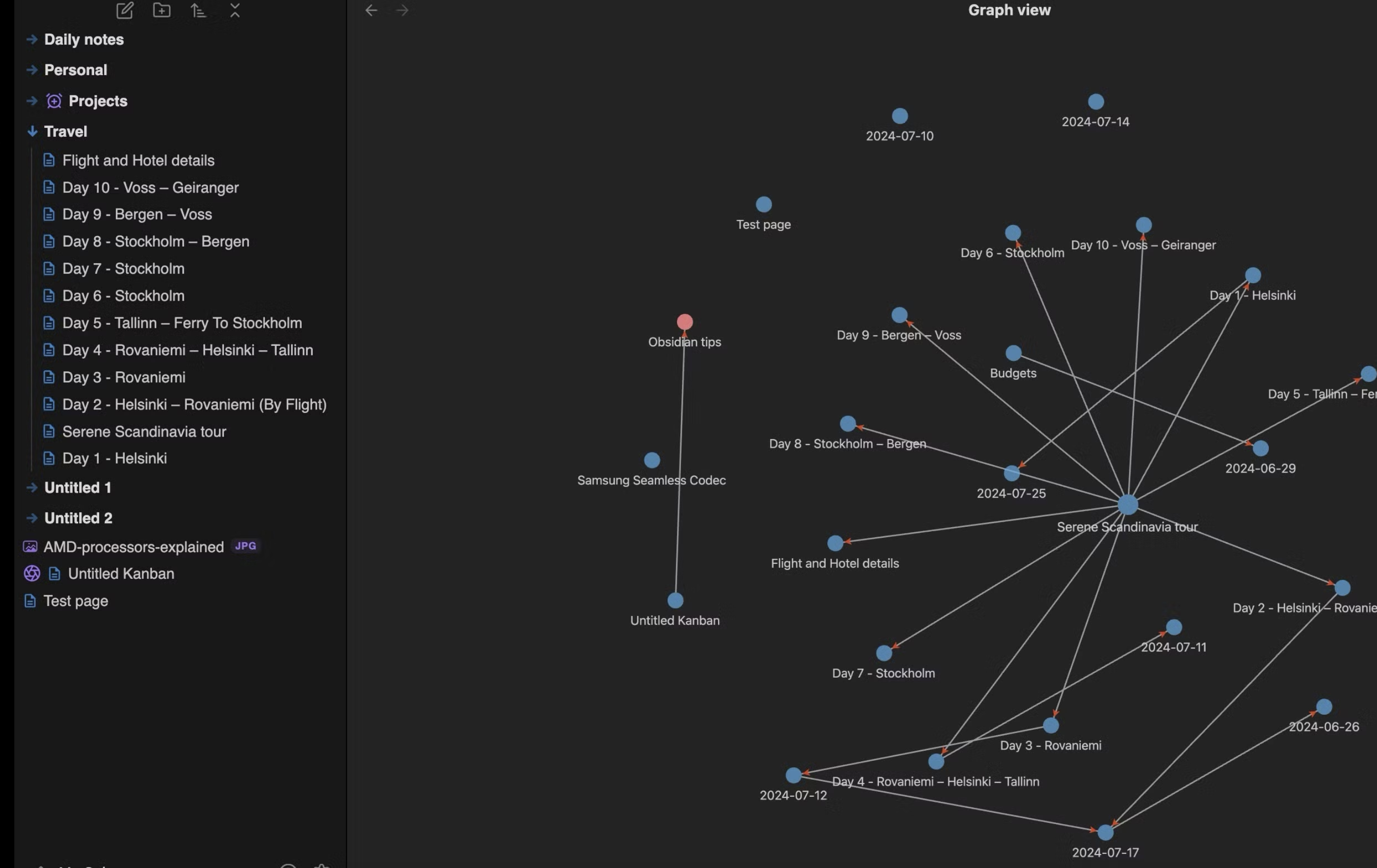
In other words, using Obsidian, integration with agents like Claude Code is more natural because you don’t need API keys or MCPs — it’s just a directory. Additionally, each document can be linked to other relevant ones, helping the model save tokens.
Summary
The core idea is simple: documentation that isn’t close to the code doesn’t survive.
AI is a great ally for documentation. Today you can automate everything without worrying about token costs. No more spending hours writing a feature doc or a post-mortem.