Table of Contents
- Overview
- Why test data?
- How to add data quality to a pipeline
- Types of tests
- Unit tests
- WAP - Write, Audit and Publish
- Where to apply tests?
- Quality dashboard and log tables
- Summary
Overview
First, it’s worth noting that while the concepts of data quality are universal, there are countless different ways to implement quality checks — depending on variables like:
- Ingestion and processing type: batch, micro batch, streaming;
- Data volume: Testing a table with 1 billion rows requires more optimization than one with 500 thousand;
- Tooling: Different tools have different syntax and ways to add tests.
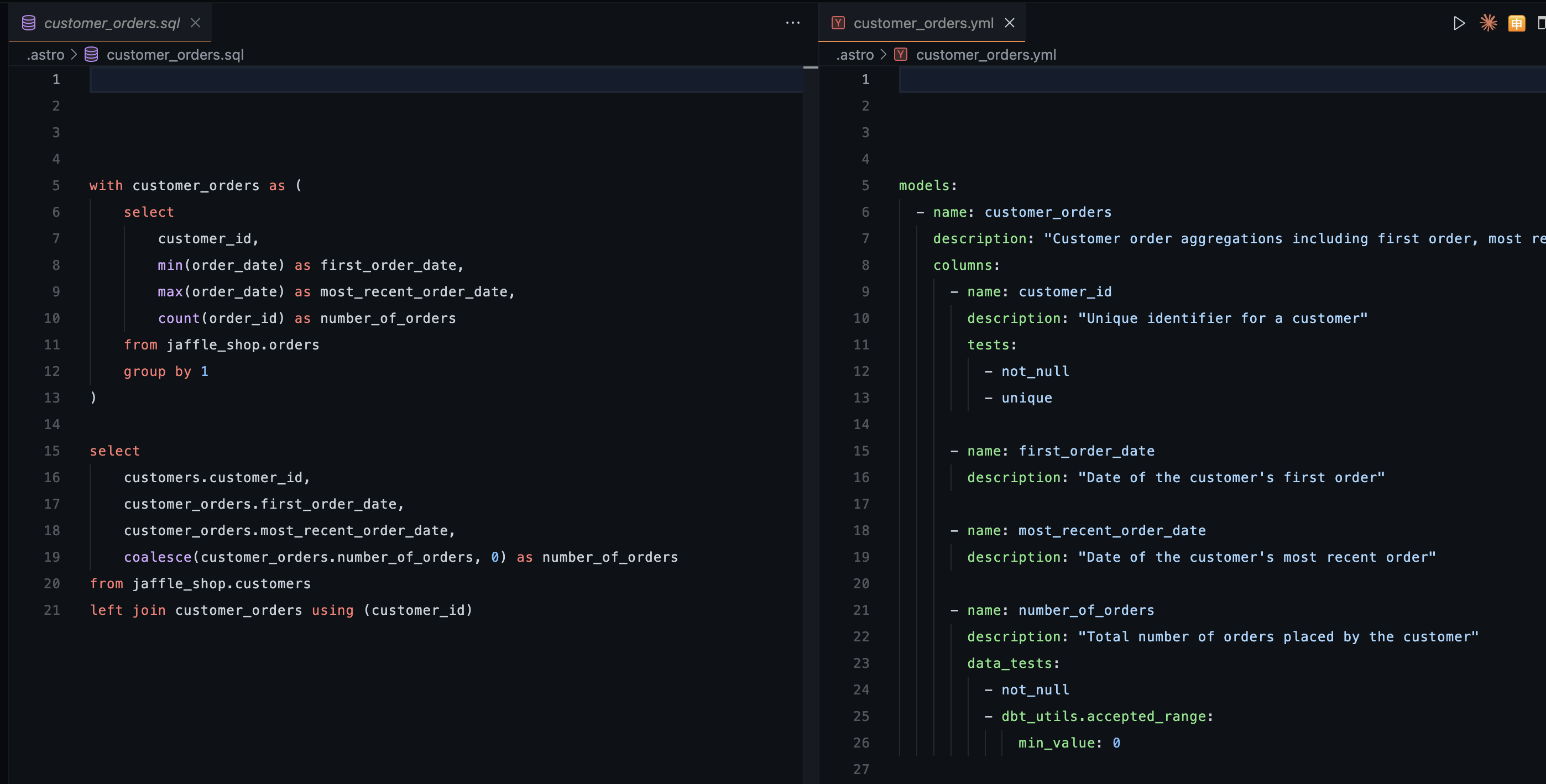
So this article focuses on the foundational concepts, but to keep it from being too theoretical, I’ll show examples using DBT. DBT is a tool that lets us create tables using SQL and store documentation and tests in a .yml file.
As you can see below, I’m creating the customer_orders table using a SQL file from the jaffle_shop table, and the documentation and tests for that table live in a .yml file.
Why test data?
The answer is pretty obvious. We don’t want customers or individuals making wrong decisions based on wrong data. On top of that, data errors can lead to:
- Loss of trust and credibility;
- Legal issues or potential lawsuits;
- Bugs and broken systems;
Among other things…
How to add data quality to a pipeline
Well, first we need to know what types of tests we can run, where, and when. That depends on the product, complexity, and business rules. A simple system doesn’t necessarily need an extremely robust and testable environment. We should always remember that testing data requires resources: CPU, memory, and especially time. So it’s up to whoever builds the pipeline to decide which tests to run.
Types of tests
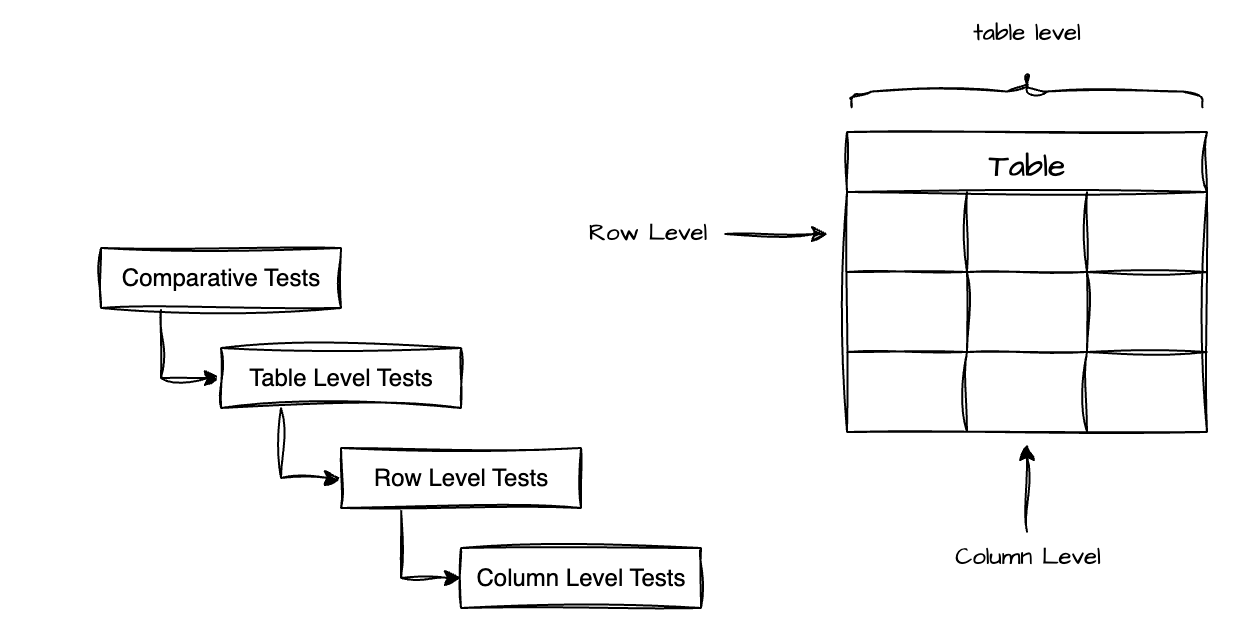
Personally, I like to separate tests into 4 levels: comparative tests, table-level tests, row-level tests, and column-level tests.
Column level tests
Here we test values in specific columns. Some examples:
- Uniqueness test: Ensures each value in a column appears only once, preventing unwanted duplicates. Although primary keys are already unique by definition, this test is essential for natural keys (like SSN, email) and unique identifiers (UIDs) that need to be unique by business rule. For example, if two customers share the same email, that might indicate a duplicate registration or an ingestion error.
DBT example:- name: customer_email description: Customer email. Must be unique to avoid duplicate registrations. tests: - unique- Null test: Validates that required columns don’t contain null values, ensuring the integrity of essential data. This test is fundamental for fields that are critical to the business or to downstream systems. For example, a user record without an email might prevent sending important notifications, or a transaction without a date could make time-based analysis impossible.
DBT example:- name: customer_email description: Customer email. Required field for communication. tests: - not_null- Accepted values test: Checks whether the values in a column fall within an allowed set or range, preventing invalid or inconsistent data. This test is crucial for columns with categorical values (status, types, categories) or for validating logical ranges. Practical examples: a boolean column should only contain true/false, a birth year can’t be greater than the current year, an order status should only be ‘placed’, ‘shipped’, ‘completed’, or ‘returned’ — any value outside these indicates a system error or incorrect data handling.
DBT example:- name: order_status description: Keep the order status. Possible values are: placed, shipped, completed, returned tests: - accepted_values: arguments: values: ['placed', 'shipped', 'completed', 'returned']
- name: monthly_sms_count description: Count of SMS sent per month tests: - dbt_expectations.expect_column_values_to_be_between: min_value: 800 max_value: 1200- Referential integrity test: Ensures that relationships between tables are valid, verifying that foreign keys reference existing records in parent tables. This test is fundamental for maintaining referential integrity in the database. For example, in an
orderstable with aproduct_idcolumn, every ID should correspond to an existing product in theproductstable. If we find an orphanedproduct_id(with no match), it indicates corrupt data — possibly a purchase of a deleted or unregistered product, a cascade deletion error, or a sync failure between systems.
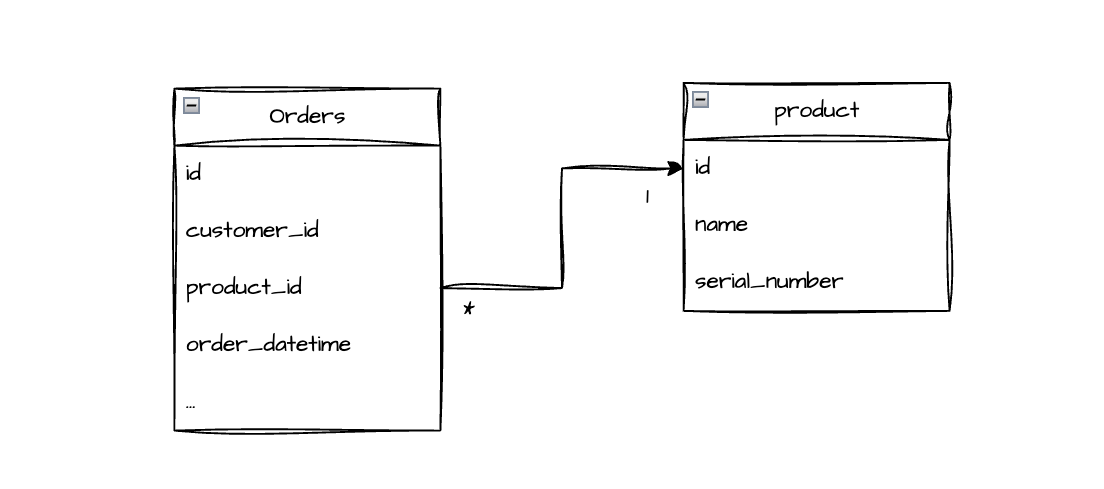
DBT example:- name: product_id description: Reference to product table tests: - relationships: to: ref('products') field: idRow level
- Consistency test: Validates the logical coherence between multiple columns in the same row, ensuring the data makes sense when analyzed together. This test catches inconsistencies that would slip through individual column validations. Practical examples: an order with status ‘completed’ must have a
completed_atdate filled in; thetotalfield must mathematically equalsubtotal + tax; an end date can’t come before a start date. These tests prevent impossible or logically invalid states in the data.
DBT example (using dbt-utils package):tests: - dbt_utils.expression_is_true: expression: "NOT (status = 'completed' AND completed_at IS NULL)" name: completed_orders_must_have_completion_date - dbt_utils.expression_is_true: expression: "total = subtotal + tax" name: total_equals_subtotal_plus_taxTable level
- Granularity test: Defines and validates the expected level of detail in each row of the table, preventing unwanted duplicates. Every table has a “grain” that determines what each row represents. For example, in an
orderstable, each row might represent “one product purchased by a customer at a specific time for a specific amount.” In that case, the combination (customer_id,product_id,order_datetime,total_value) should be unique — if two rows have exactly the same values, they’re probably duplicates. Important note: don’t include auto-generated IDs in this test, since true duplicates would have identical business fields but different IDs, making the test miss the problem. This test ensures you understand and maintain the correct granularity according to the business rule.
DBT example (using dbt-utils package):
- name: customer_orders description: "Customer order aggregations including first order, most recent order, and total order count" columns: tests: - dbt_utils.unique_combination_of_columns: combination_of_columns: - order_datetime - total_value - customer_id - product_id- Freshness test: Monitors whether data is being updated as expected, detecting silent breaks in ingestion or processing. This test is critical for pipelines with defined cadences (daily, hourly, real-time). For example, if a table is updated daily and suddenly goes 3 days without new data, that indicates a source failure, a broken ingestion job, or connectivity issues. Catching this quickly prevents decisions from being made based on stale data.
DBT example (configured at source level in schema.yml):sources: - name: raw_data tables: - name: orders freshness: warn_after: {count: 1, period: day} error_after: {count: 3, period: day}- Volume test: Validates that the total number of records in the table falls within an expected range, detecting volumetric anomalies. Drastic changes in row count often signal serious problems: a 50% drop might mean a partial ingestion failure, incorrect filters being applied, or data loss; an abnormal increase (e.g., tripling overnight) might indicate data duplication, infinite loops, or a double load. This test works as a high-level sanity check on the table’s health. One way to run this test is with comparative tests or by comparing staging and production tables (covered in the WAP section).
- Source parity test: Ensures that data ingestion from the source was complete and successful by comparing row counts between the source table and the destination table. This test is essential in ETL/ELT processes to validate that no data was lost or duplicated during transfer. If the source table has 10,000 records but your ingested table has only 8,500, that signals data loss during the copy process. Conversely, having more rows than the source might indicate duplication. This test validates the integrity of the ingestion process from the source.
DBT example (using dbt-utils package):tests: - dbt_utils.equal_rowcount: compare_model: source('raw_data', 'orders')Comparative tests
End-to-end traceability tests in the ETL: These tests track key metrics across the entire pipeline, ensuring that transformations and aggregations aren’t causing unexpected data loss. They act as a “lineage audit” for your data.
Practical example: Imagine three cascading tables:
patients(1000 patients)patient_visits(created from patients)patient_observations(created from patient_visits)
The logic: If you have 1000 unique patients in the first table, the derived tables should reference those same 1000 patients (assuming all patients have at least one visit/observation, or that the business logic around filters is clear).
The problem it detects: If patient_observations suddenly shows data for only 800 patients, you know that 200 patients “disappeared” somewhere in the ETL — maybe an incorrect JOIN, a badly applied filter, or a transformation that didn’t account for edge cases. This test forces documentation and validation of business logic. If losing those 200 patients was expected (e.g., patients without recorded observations), that rule should be documented and the test threshold adjusted accordingly.
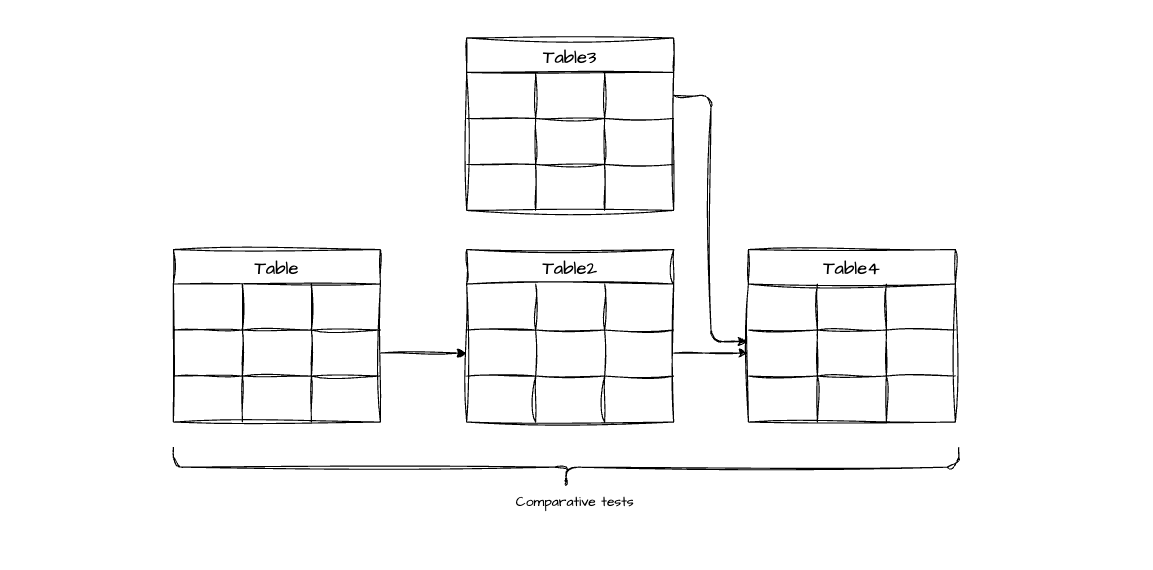
An example of a comparative test to track patient count:
WITH base_counts AS ( SELECT 'patients' AS table_name, COUNT(DISTINCT patient_id) AS unique_patients FROM patients
UNION ALL
SELECT 'patient_visits' AS table_name, COUNT(DISTINCT patient_id) AS unique_patients FROM patient_visits
UNION ALL
SELECT 'patient_observations' AS table_name, COUNT(DISTINCT patient_id) AS unique_patients FROM patient_observations),
base_reference AS ( SELECT unique_patients AS base_count FROM base_counts WHERE table_name = 'patients'),
comparison_results AS ( SELECT base_counts.table_name, base_counts.unique_patients, base_counts.base_count, (base_counts.unique_patients - base_reference.base_count) AS difference, ROUND(100.0 * base_counts.unique_patients / base_reference.base_count, 2) AS retention_percentage, ROUND(100.0 * (base_reference.base_count - base_counts.unique_patients) / base_reference.base_count, 2) AS loss_percentage FROM base_counts CROSS JOIN base_reference)
SELECT table_name, unique_patients, base_count AS expected_patients, difference, retention_percentage, loss_percentage, CASE -- Threshold: allow up to 5% loss (adjust according to business rule) WHEN retention_percentage >= 95.0 THEN 'Pass' WHEN retention_percentage >= 90.0 THEN 'Warn' ELSE 'Error' END AS test_status, CASE WHEN retention_percentage < 95.0 THEN 'WARNING: ' || ABS(difference) || ' patients disappeared. Check JOINs, filters, and transformations.' ELSE 'Pipeline maintaining data integrity.' END AS diagnosisFROM comparison_resultsORDER BY table_name;Anyway, there are many other tests out there, as well as custom tests you can build. And there are libraries that help with that — a famous example is Great Expectations, which has interfaces for Spark and DBT. Here you can find more existing tests:
Unit tests
We all know unit tests in software development, right? When you create a function with sufficiently complex logic, you should write tests to verify it handles the expected cases (and not to prove the function is correct — but that’s a topic for another article).
We can apply the same concept to tables. During an ETL process, tables are generated via SQL, with upstream tables (dependencies) and downstream tables (derived). In many cases, a SQL query is simple enough that unit tests aren’t needed. If you’re a competent developer or data engineer, you’ll handle joins, case statements, window functions, and other features correctly. However, there are complex tables with multiple joins and transformations that make it hard to understand the final result. In those cases, unit tests can ensure your SQL logic is correct.
TDD - Test Driven Development
TDD is a programming methodology where you write the test first — already knowing the expected output — and then implement the function. Knowing the expected result upfront helps you build the implementation correctly. In data engineering, the principle is the same: by writing unit tests with expected results, you can catch SQL errors that would otherwise go unnoticed. It’s an excellent strategy for dealing with complex tables.
An example of a unit test in DBT:
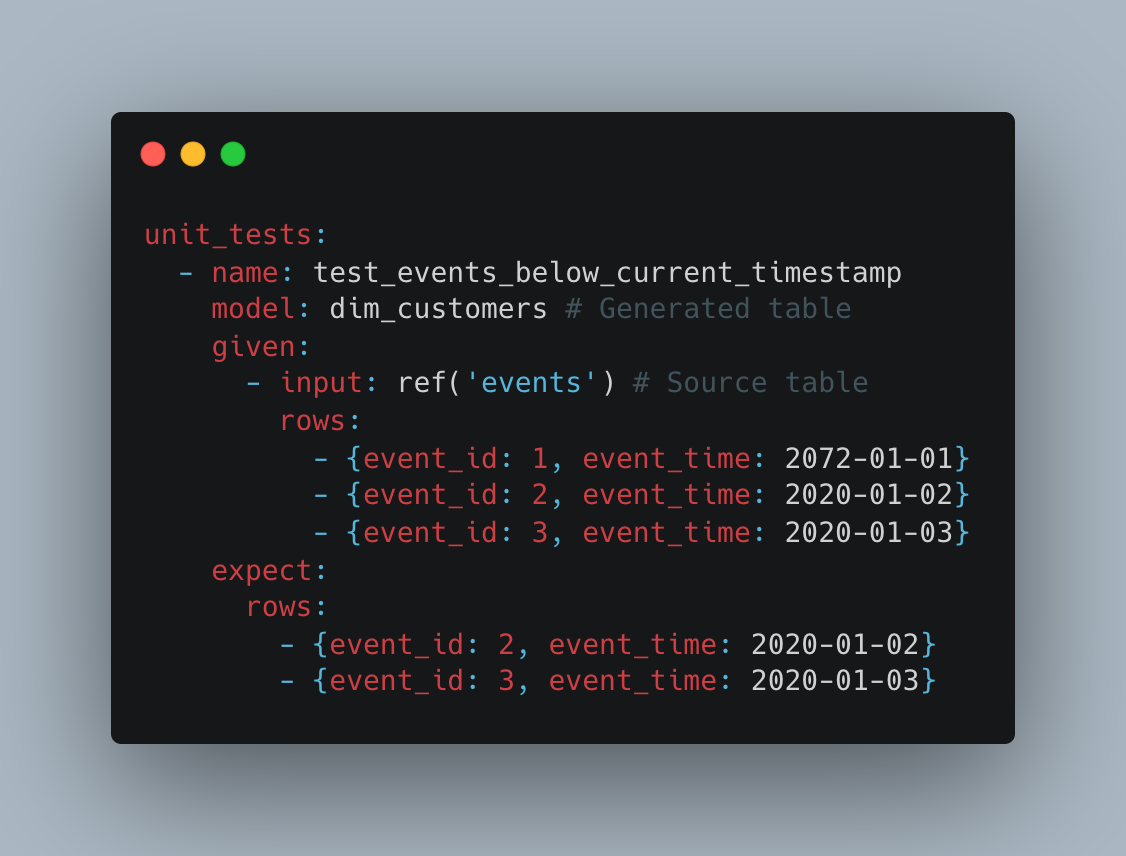
In the example above, we’re creating the dim_customers table. We create mocks of the input rows from a table needed in the SQL logic (in this case the events table) and the expected output of the dim_customers table.
WAP - Write, Audit and Publish
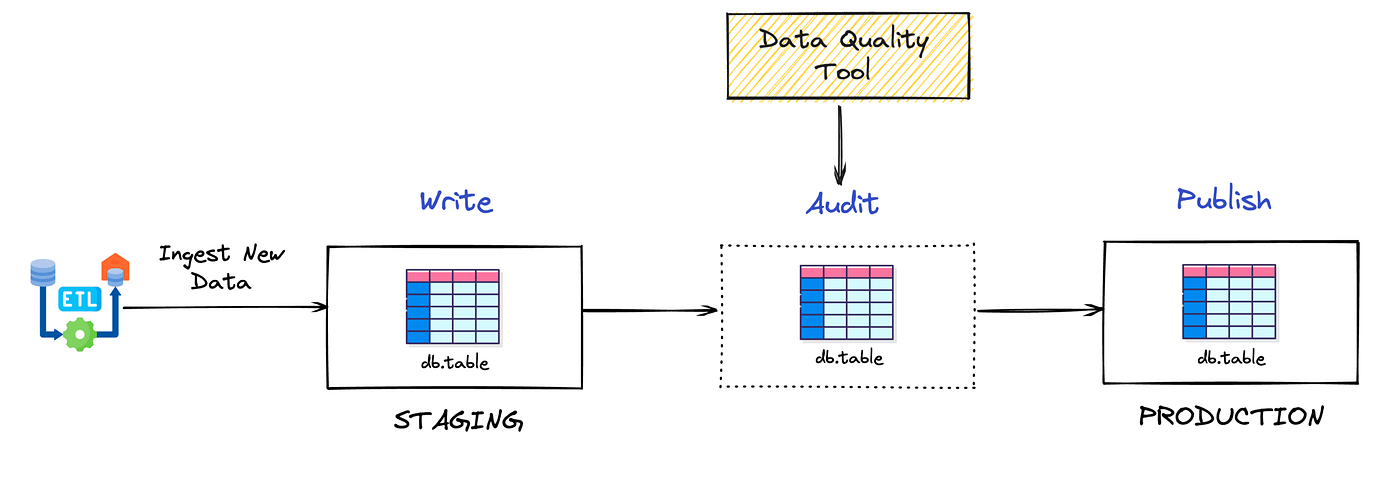
What is Write, Audit and Publish?
WAP is a data architectural pattern that introduces two table branches: staging and production.
- Production: Production tables that feed dashboards, applications, and end clients
- Staging: Tables with pending changes that need to be validated before being promoted to production
Flow: Data is written to staging → goes through all quality checks → after validation, is promoted to production.
Why is WAP important?
Beyond column, row, table, and comparative tests, WAP enables regression testing between states, comparing staging vs production versions of the same table.
Practical protection example:
Imagine you have a customers table with 50,000 rows in production. A data engineer modifies the SQL logic and accidentally introduces a restrictive filter, resulting in only 30,000 rows in the staging version.
- Without WAP: Column, row, and table tests keep passing (since they only validate structure and internal rules), and the incorrect data goes to production
- With WAP: A comparative test detects a 40% drop in row count between production and staging, blocking the deploy and alerting about the anomaly before it affects end users
This pattern adds a critical validation layer that catches regressions and unexpected volumetric changes that would slip through isolated tests.
SQL test example comparing staging vs production
-- Test: Detect abnormal row count variation between production and staging-- Fails if the difference exceeds 15%
WITH prod_count AS ( SELECT COUNT(*) as total_rows FROM production.customers),staging_count AS ( SELECT COUNT(*) as total_rows FROM staging.customers),comparison AS ( SELECT prod_count.total_rows as prod_rows, staging_count.total_rows as staging_rows, ABS(staging_count.total_rows - prod_count.total_rows) as row_difference, ROUND( 100.0 * ABS(staging_count.total_rows - prod_count.total_rows) / NULLIF(prod_count.total_rows, 0), 2 ) as percentage_change FROM prod_count CROSS JOIN staging_count)SELECT prod_rows, staging_rows, row_difference, percentage_change, CASE WHEN percentage_change > 15 THEN 'FAIL: Variation exceeds 15% threshold' ELSE 'PASS' END as test_resultFROM comparisonWHERE percentage_change > 15; -- Query only returns rows if the test failsOther useful comparative tests in WAP:
- Critical aggregated value validation: Compare totals (e.g., sum of revenue, count of active orders)
- Key verification: Ensure all keys present in production also exist in staging
- New null detection: Alert if columns that had no nulls in production now have them in staging
Where to apply tests?
You can never have too many tests, but we can’t forget they consume resources: CPU, memory, and time. There are strategies to deal with this, like partitioning and heuristic tests, which I won’t cover here.
That said, if a pipeline is simple, I don’t think having all the tests I presented is necessary — it might even be overengineering.
I think the most important tests that should be everywhere are: null checks, uniqueness, referential integrity, and accepted values.
Quality dashboard and log tables
Here we have two important concepts.
Log tables
These are tables designed to create logs about your ETL. For example: if you have a products table that should have serial numbers, you might create a log_product_without_serial_number table that shows products without a serial number. You can simply run SELECT * FROM log_product_without_serial_number without needing to dig into your ETL. Or maybe you need a log_customer_count table that shows the number of customers in each table containing a customer_id, letting you spot if any table has fewer customers than expected (yes, a comparative test — but as a table).
Data quality dashboard
With all your log tables in place, you can build a centralized BI view where you can see all your ETL issues in one place without running queries. Plus, non-technical people can see and understand it. For example, if you have a chart showing that 10% of products are missing a serial number, the person responsible for cataloging can see which ones are missing.
Summary
We covered table, column, row, and comparative tests, log tables, how to test tables between staging and production, and unit tests.
These tests are for batch pipelines (not streaming) and for low/medium data volumes. Of course everything works for Big Data too, but you’d need optimization strategies.
Take care.